Troubleshooting
Sound Issues
If you have issues with the sound on your computer…
- Check that the blue Audio Interface is plugged in.
- Open the volume settings page with
option+🔊(option volume)- In the volume settings page, make sure “Presonus AudioBox iTwo” is selected as the output device.
- On your keyboard, the option key may be labeled
altoroptor⌥ 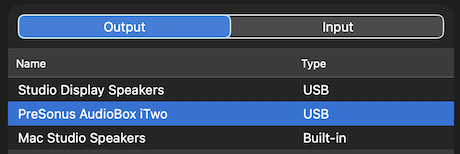
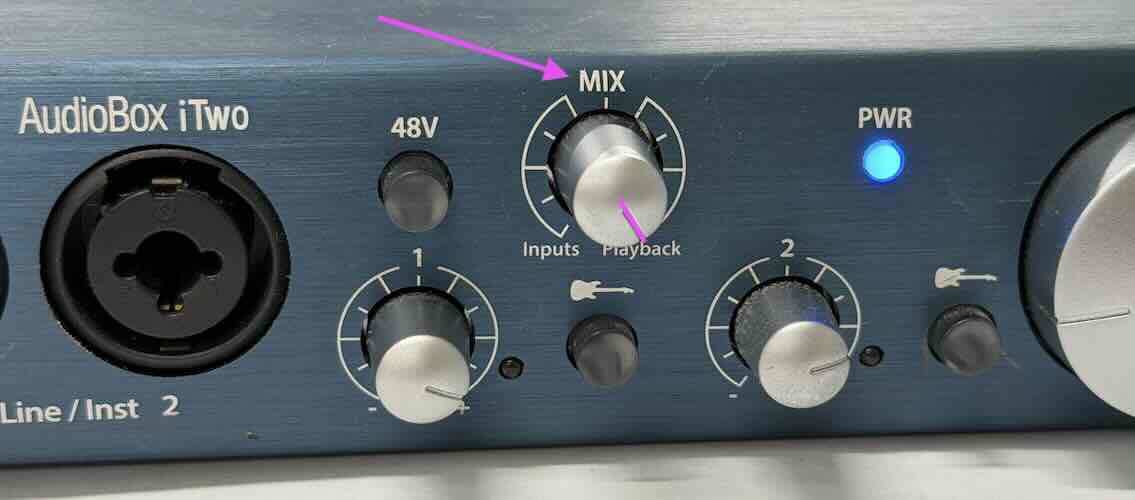
- Check that the
Mixknob on the AudioBox iTwo is turned all the way to the right (towardsPlayback). - Adjust the
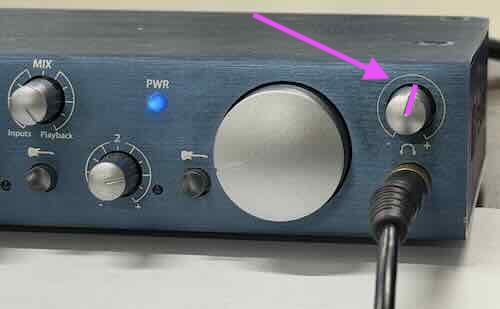
Volumeknob on the AudioBox iTwo. This is the small knob next to where the headphones are plugged in.
Finding Apps
Use the Command Space shortcut to open Spotlight Search. Then type in the name of the app you want. Double click on the app to open it.
Logging Off
Type in Command Shift Q to log off of your computer.
If someone forgot to log off and the computer is now locked, you will need to turn of the computer by holding the power button for ten seconds.
Copy & Paste
On the Macs, copy and paste is a bit different. Use the command key instead of the control key.
Copy is Command C
Paste is Command V
Closing Apps
To close an app completely (especially because an app is misbehaving), try Command Q to quit an app.
Force quit is a special option if needed. To force quit an app, press Command Option Escape and then select the app you want to force quit.