Turning In Work
Every assignment in this class is turned in the same way. Learn it once.
The Three Rules
1. An original name
Not Untitled Score, not Untitled-3, not just your last name. Make up a title nobody else would land on by accident: Purple Car. Giant Fork. Toasted Pop Tarts Are Fire. Some lessons give you a specific name instead — use it.
The name goes in two places and they match: the title on the score or project and the file name. Your name goes in the composer spot.
2. Export, then upload the file
Saving is not turning in. The project stays with you so you can keep working. What gets submitted is an exported file — never a share link unless the lesson says so.
3. Every required file, in one submission
MuseScore assignments need two files: an MP3 and a PDF. One without the other is an incomplete assignment. Video projects need the exported video, not an MP3 and not a Soundtrap link.
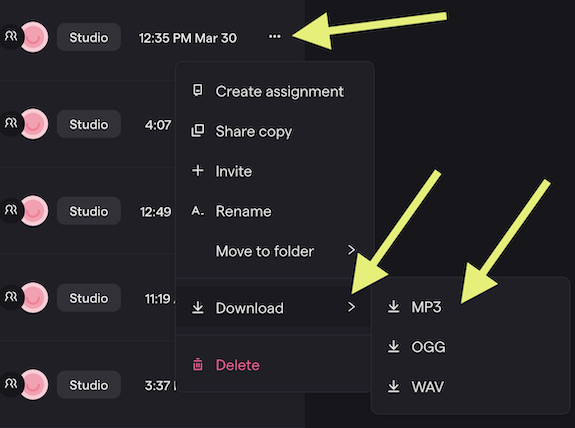
Soundtrap: Export an MP3
- Play the project once more and listen to the whole thing.
- Open the File menu, choose Export, then MP3.
- Save it somewhere you can find it (Downloads is fine).
- Upload the MP3 to the assignment on CTLS.
Soundtrap: Export a Video
For sound-for-screen projects.
- File → Export, choose the video option, and save the file to your computer.
- In the assignment’s discussion on CTLS, click Upload Video and choose that file.
- Post once. Your post appears after Mr. Willingham approves it.
Stop editing with 10 minutes left — exporting and uploading a video takes time.
MuseScore: Export an MP3 and a PDF
| File | How | What it proves |
|---|---|---|
| MP3 | File → Export → MP3 | What the music sounds like |
| File → Export → PDF | What it looks like on the page |
Both carry the project’s title: Purple Car.mp3 and Purple Car.pdf. Upload both to the one assignment on CTLS. Save the .mscz file too — it is the only version you can keep editing.
The MP3 is audio only: anyone can press play, but there is nothing to look at. The PDF is the page: the notes, the repeat signs, the form, exactly as written, and it makes no sound. One file to hear it, one to see it.
Files, Not Links
A Soundtrap share link, a MuseScore share link, or a screenshot is not a submission. If the lesson says MP3, upload an MP3. If it says video, upload a video.