Beat Making
Parts of the Drum Kit
- Kick (bass drum) — the deep, low sound that anchors the beat. Usually beats 1 and 3.
- Snare — the sharp crack that provides the backbeat. Usually beats 2 and 4.
- Hi-hat — a pair of cymbals that keep a steady rhythm. Closed is tight and crisp; open is sloshy and sustained.
- Crash cymbal — accents, often at the start of a new section.
- Ride cymbal — a steady-rhythm role like the hi-hat, with a different tone.
- Toms — pitched drums, used in fills.
- Accessories — cowbell, tambourine, claps, shakers.
A groove is what you get when these lock together. The next time you listen to a song, pick out the kick, snare, and hi-hat one at a time.
MIDI
MIDI (Musical Instrument Digital Interface) is a way for electronic instruments and computers to communicate. It is instructions, not sound — which note, when, and how hard (velocity). A MIDI controller or a pattern grid sends those instructions to the drum sounds in Soundtrap.
Controller types: pad (a grid of squishy buttons), keyboard (looks like a piano), pedal (played with your feet), and drum (a plastic kit played with sticks).
Patterns Beatmaker
Soundtrap’s built-in drum machine. Each row is a drum sound and each column is a moment in time. Click a box and that drum plays at that moment.
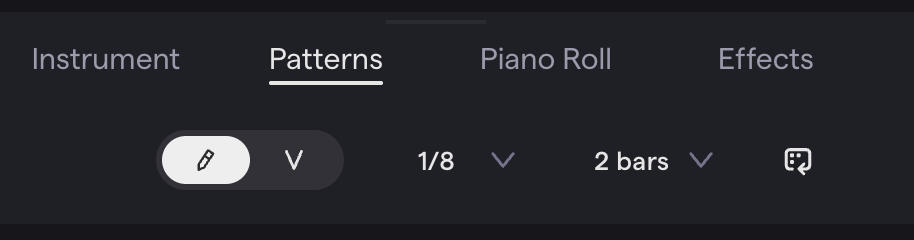
Extras: add a crash or open hi-hat row, switch to 1/16 for finer control, extend to 4 measures, or use velocity mode to vary how hard each hit lands.
The Rock Beat
Steady hi-hat, kick on beats 1 and 3, snare on 2 and 4. Sixteen steps, two per beat; X means click that box.
| Step | 1 | 2 | 3 | 4 | 5 | 6 | 7 | 8 | 9 | 10 | 11 | 12 | 13 | 14 | 15 | 16 |
|---|---|---|---|---|---|---|---|---|---|---|---|---|---|---|---|---|
| Closed Hi-Hat | X | X | X | X | X | X | X | X | X | X | X | X | X | X | X | X |
| Kick | X | X | X | X | ||||||||||||
| Snare | X | X | X | X | ||||||||||||
| Measure | 1 | - | - | - | - | - | - | - | 2 | - | - | - | - | - | - | - |
Hi-hat on every step; kick on 1, 5, 9, 13; snare on 3, 7, 11, 15.
Fills
A fill is a short phrase that adds interest and marks the end of a section. In a 16-step pattern it normally lives in the last four steps. Two ways to make one:
Add sounds — toms and a crash in steps 13–16:
| Step | 1 | 2 | 3 | 4 | 5 | 6 | 7 | 8 | 9 | 10 | 11 | 12 | 13 | 14 | 15 | 16 |
|---|---|---|---|---|---|---|---|---|---|---|---|---|---|---|---|---|
| Closed Hi-Hat | X | X | X | X | X | X | X | X | X | X | X | X | X | X | X | X |
| Kick | X | X | X | X | ||||||||||||
| Snare | X | X | X | X | ||||||||||||
| Tom | X | X | X | X | ||||||||||||
| Crash | X |
Take away or move sounds — the hi-hat stops after step 13 and the last snare moves from 15 to 16:
| Step | 1 | 2 | 3 | 4 | 5 | 6 | 7 | 8 | 9 | 10 | 11 | 12 | 13 | 14 | 15 | 16 |
|---|---|---|---|---|---|---|---|---|---|---|---|---|---|---|---|---|
| Closed Hi-Hat | X | X | X | X | X | X | X | X | X | X | X | X | X | |||
| Kick | X | X | X | X | ||||||||||||
| Snare | X | X | X | X |
Combine both. Whatever you do, a listener should still hear the rock beat underneath.
Four on the Floor
The kick plays on every beat — 1, 2, 3, 4. House, disco, rock, pop. Snare on 2 and 4, hi-hat on eighth notes.
Recording a Live Drum Track
Play the drums in instead of clicking a grid.
Sharing a controller with a table-mate: each of you works in your own project on your own computer; swap the controller between tracks so both of you use both input methods.
Quantization
When you play a beat by hand, your hits land a little early or late. Quantization snaps every recorded note to the nearest point on a grid. It is rounding for musical timing: a snare at beat 2.07 rounds down to 2, one at 1.94 rounds up to 2.
The grid value is the place value you round to:
| Grid | Rounding | Use for |
|---|---|---|
| 1/4 note | Coarsest — every note jumps to the nearest beat | Kick and snare on the beat |
| 1/8 note | Finer | Hi-hats and most grooves |
| 1/16 note | Finest — keeps more human feel, also keeps more sloppiness | Busy parts |
Match the grid to what you played. Quarter-note kick and snare need a 1/4 grid; a 1/16 grid leaves the mistakes where they are. An eighth-note hi-hat needs a 1/8 grid; a 1/4 grid drags every off-beat hit onto the beat and erases half of them. Quantization is just note values — see Music Reading 101.
How to quantize in Soundtrap
- Select the recorded track and click Piano Roll.
- Select the notes — click and drag, or click one and
cmd + A. - Right-click → Quantize and choose a subdivision.
- Listen. It should sound tighter.
You can also hover over a region, click Edit, then Quantize, without opening the Piano Roll.