Sound Design Project
The summative for the sound-for-screen unit. Students have already scored Urban Runner together, set up microphones (Recording Setup), and practiced the effects (Sound Design). Now they do it alone, with a sound they recorded themselves.
Schedule
| Project Day | Plan |
|---|---|
| 1 | Build — read the requirements and rubric, pick a clip, set up, build the soundtrack |
| 2 | Finish and Submit — self-score against the rubric, fix the lowest row, export as video, upload |
| 3 | Share and Vote — watch six classmates, rank a top four |
Pick One Clip
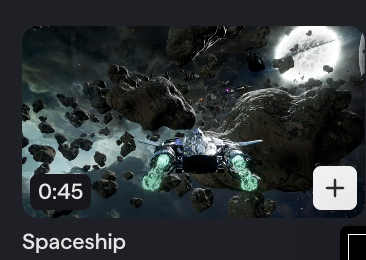
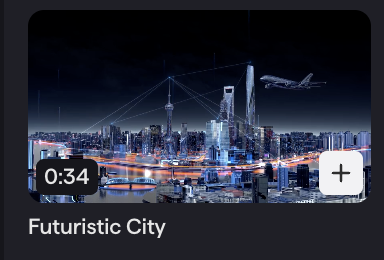
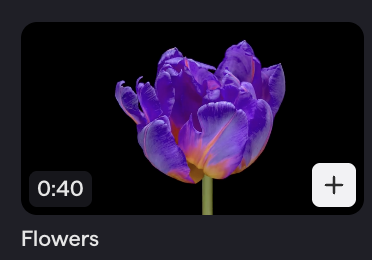
All three are in Soundtrap’s Video Library.
| Spaceship (0:45) | Futuristic City (0:34) | Flowers (0:40) |
|---|---|---|
 |  |  |
Set Up
- Soundtrap → New Project → the video option → Video Library → your clip.
- Name the project Sound Design Project.
- Drag in your found sound — the recording you turned in on CTLS. Turned it in late? You can still submit it for partial credit; you still need it here.
Requirements
- Found sound. At least one sound you recorded yourself.
- Effects. Change your sounds with a combination of effects.
- Automation. A volume curve on at least one track.
- Sound throughout. Sound or music from the first frame to the last. No dead silence.
- Sync. Every key moment on screen lands on a prominent sound.
Any sounds and music loops from the Soundtrap library may be used as well.
Effects to Try
Reverb (small room, hall, cave, outer space), delay (short time + high feedback is a sci-fi charge-up), EQ (cut highs to muffle, cut lows to thin, boost lows for a heavy hit), distortion, modulation, pitch shift (drop your found sound low to make it big). Stack two or three on one track; change the order and listen again. Definitions on Sound Design.
Automation
Anything that moves toward or past the camera gets a curve, not a straight line — the same as the Urban Runner vehicles. Ideas: the ship or an asteroid flying past, the plane crossing the skyline, a swell as the flower opens. See the automation curve.
Rubric
Each row is 20 points. Total 100.
| Requirement | 20 — Full | 10 — Partial | 0 — Missing |
|---|---|---|---|
| Found sound | My own recording is in the project and you can hear it | It is there but buried or hard to hear | No found sound |
| Effects | Two or more different effects clearly change my sounds | One effect, or effects you cannot really hear | No effects |
| Automation | A volume curve on at least one track matches movement on screen | Automation is a straight line or does not match the picture | No automation |
| Sound throughout | Sound or music from the first frame to the last | One or two silent gaps | Mostly silent |
| Sync | Every key moment lands on a prominent sound | Some key moments are missed or noticeably late or early | Sounds do not line up |
Project Day 2: Finish and Submit
Play the whole project once and score yourself on each row: 20, 10, or 0. Anything below 20 is the to-do list; start with the lowest row.
- No found sound? Use a take from your Found Sounds project, or record one now on your phone.
- Found sound buried? Turn it up or turn the other tracks down.
- Gap of silence? Stretch the ambience or add a music loop underneath.
- Late hit? Zoom in and nudge until it lands on the frame.
Stop editing with 10 minutes left. Export as a video and upload it to the CTLS discussion (Turning In Work). A Soundtrap link or an MP3 is not a submission.
Project Day 3: Share and Vote
Peer Voting: watch your six, judge them against the five rubric rows, rank a top four. Points 10 / 6 / 3 / 1. You only need four of your six posted to vote.
Checkpoints
Day 1
- I read all five requirements and the rubric, and picked my clip.
- My found sound is in the project and audible.
- At least two effects, at least one volume curve, sound throughout, every key moment on a sound.
Day 2
- Every row of my self-score is a 20, or as close as I can get.
- My video is exported and uploaded.
Day 3
- My video is posted.
- I watched my six and submitted the form once with 1, 2, 3, 4.
Teacher Notes
- The found-sound homework (record one interesting sound on your phone, upload to CTLS) is assigned on the microphone day, two to three days before Project Day 1.
- Day 2 early finishers can start the podcast brainstorm (Podcast Project Day 1).
- Exit tickets: Which moment in your clip needs the biggest sound, and what will you use? (Day 1); Which row did you improve today and what did you change? (Day 2); What did your number 1 pick do that you wish you had done? (Day 3).